This old version of Proteopedia is provided for student assignments while the new version is undergoing repairs. Content and edits done in this old version of Proteopedia after March 1, 2026 will eventually be lost when it is retired in about June of 2026.
Apply for new accounts at the new Proteopedia. Your logins will work in both the old and new versions.
Proteopedia:Cookbook
From Proteopedia
m |
m (refining update to the structure applet tag for the rectangular jmol) |
||
| Line 1: | Line 1: | ||
| - | ==Rectangular Jmol Applets== | + | ==Rectangular Jmol Structure Applets== |
[http://jmol.sourceforge.net/jslibrary/ jslibrary] describes:<br> | [http://jmol.sourceforge.net/jslibrary/ jslibrary] describes:<br> | ||
For a rectangular applet, an array containing two elements, width and height; this is usually easiest to do using JavaScript square bracket notation for array constants, as in [400, 200], ["50%", "100%"] or [0.5, 1.0]. Proteopedia currently only accepts integers, as in this example <b>size='[800,200]'</b> | For a rectangular applet, an array containing two elements, width and height; this is usually easiest to do using JavaScript square bracket notation for array constants, as in [400, 200], ["50%", "100%"] or [0.5, 1.0]. Proteopedia currently only accepts integers, as in this example <b>size='[800,200]'</b> | ||
| - | |||
| - | <applet load='1stp' size='[800,200]' frame='true' align='right' caption='Insert caption here' /> | ||
<structure load='1stp' size='[800,200]' frame='true' align='right' caption='Insert caption here' /> | <structure load='1stp' size='[800,200]' frame='true' align='right' caption='Insert caption here' /> | ||
Revision as of 19:17, 24 April 2011
Contents |
Rectangular Jmol Structure Applets
jslibrary describes:
For a rectangular applet, an array containing two elements, width and height; this is usually easiest to do using JavaScript square bracket notation for array constants, as in [400, 200], ["50%", "100%"] or [0.5, 1.0]. Proteopedia currently only accepts integers, as in this example size='[800,200]'
|
Quicktime .mov
<qt>file=film.mov|width=320|height=260|autoplay=true|loop=true</qt>
Shows the movie with the with a width of 320 and a height of 240 pixels that starts playing as soon as its loaded.
<qt>file=film.mov|width=320|height=240|autoplay=false|controller=true</qt>
Shows the movie with the with a width of 320 and a height of 240 pixels that does not play when loaded, but waits for the user to click on the play button.
Attribute Reference
- width=px or % (Modify the width of the object)
- height=px or a% (Modify the height of the object)
- autoplay=true/false (Start playing the file or wait at first frame, default:true)
- controller=true/false (Show the controller, default:true)
- loop=true/false (Plays again and again, default:false)
[edit]
Quiz
The special implementation of Quiz in Proteopedia includes an email feedback to the teacher. See overview at Help:Quiz and the full explanation and examples on How To Use at Help:Quiz at Wikiversity.
<quiz display=simple>
{
|type="{}"}
Name a famous Greek philosopher.
{ Aristotle|Plato }

{Question
|type="[]"}
+ Correct answer.
- Incorrect answer.
+ Correct answer.
- Incorrect answer.
</quiz>
Imagemaps
In the image map below, clicking on the computer screen should lead you to 2ace, the keyboard to 1rat,
and the thinking balloon to Believe It or Not!. A click on the person's head goes to the external article on Student at Wikipedia.
The (i) goes to the image info.
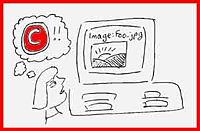

<imagemap>
Image:Foo.jpg|200px|picture of a foo
poly 131 45 213 41 210 110 127 109 [[2ace]]
poly 104 126 105 171 269 162 267 124 [[1rat]]
rect 15 95 94 176   [http://en.wikipedia.org/wiki/Student]
# A comment, this line is ignored
circle 57 57 20    [[Believe_It_or_Not!]]
desc bottom-left
</imagemap>
Here's a nice tool for finding the coordinates in an image.
Theoretical Models
On pages that largely or entirely concern theoretical model structures, please insert {{Theoretical_model}} in the top of the wikitext box. It will generate this banner:
 |
If a page shows largely empirical models, but also one or more theoretical models, please put Theoretical Model in the text, and/or as a caption in Jmol whenever the model is theoretical:
- The wikitext is: '''<font color='red'>Theoretical Model</font>'''
- To add the red caption to a scene, use the "labels" tab in the Scene Authoring Tools and open the "caption" section.
Policy concerning theoretical models is at Proteopedia:Policy#Theoretical_Models, where you will also find links to examples.
Floating quote Box
| Alice's Adventures in Wonderland by Lewis Carroll Project Gutemberg |
There was nothing so very remarkable in that; nor did Alice think it so very much out of the way to hear the Rabbit say to itself, `Oh dear! Oh dear! I shall be late!' (when she thought it over afterwards, it occurred to her that she ought to have wondered at this, but at the time it all seemed quite natural); but when the Rabbit actually took a watch out of its waistcoat-pocket, and looked at it, and then hurried on, Alice started to her feet, for it flashed across her mind that she had never before seen a rabbit with either a waistcoat-pocket, or a watch to take out of it, and burning with curiosity, she ran across the field after it, and fortunately was just in time to see it pop down a large rabbit-hole under the hedge.
{{Quote box
 | quote  =
 | source =
 | width  =
 | align  =
}}
Link external sites from Jmol applet's CAPTION
Flash
This loads a local .swf file. The interactive feature works fine. Click buttons and slide controls to try. <swf width="400" height="300">/wiki/images/8/8c/7_scrolling.swf</swf>
KiNG
To insert a KiNG (Kinemage, Next Generation) applet use this tag and provide as file the name of a Kinemage uploaded file:
<kinemage align="left" width="420" height="300" file="HbAllo.kin"/>
(KineMage currently not supported)
Proteopedia Page Contributors and Editors (what is this?)
Eric Martz, Jaime Prilusky, Wayne Decatur, Angel Herraez, Karsten Theis, Eran Hodis, Karl Oberholser
